Monday, 20 March 2017

Wednesday, 15 March 2017

Weekly Reflection - Sketchbook Work (1)

This week has been very productive. I have managed to complete my moodboard and doodle some ideas.

My concept is for the woman looking in to the mirror sees a gruesome and rotted version of herself, thus portraying the vanity of looking at herself and the hallucination of what isn't really there. This is just a thumbnail but I have considered ideas such as the woman and the rotted figure swapped places, so that its the lady inside the mirror and the her rotted self looking in to it, this would also affect how vain she is to only see beauty where as she is actually rotting and decaying.


Share:

Friday, 10 March 2017

Initial Planning and Mapping


Inspired by my tutors own diagram I started to plan one based around story telling. I really want to portray a bit of background in my piece, as if it tells itself.

Two things I really wanted to capture in this piece is decay and hallucination which are the two main branches from story telling. A lot of what I jotted down was absolute word vomit but all of what branched out is what is influencing my work.


Share:

Thursday, 9 March 2017

Monday, 6 March 2017

TARGETS

Complete Research Tasks

The research is a vital influence to my work and I on the last week I would prefer to focus primarily on my practical work such as my turnaround and dynamic poses. As of right now the only topics I need to cover is my own research, sequential illustrations and contemporary animation, I have completed character design and historical animation.

Time Management

I have worked a lot towards my time management since the last unit but still need the extra kick with this one. I personally would have preferred to have been on to colouring my turnaround by now but I am still on the lining process and feel behind compared to the rest of the class. I have made my own personal deadline to finish up my line and colour by Monday. I will continue shading and and drawing up my colour palette before Wednesday.

Documentation

I feel that I could go more in depth with my documentation, I struggle to write about how to expand on certain subjects other than what it does and how it will benefit me. After talking over it with my piers I feel I could go further in to detail instead of writing single sentences.

Development

Development is something I don't do enough of. I have tested the different hairs, outfits and expanded on the different reasons why I feel certain things are more suitable but I haven't followed it up with the practical work. I can do more work in my sketchbook to improve on this.
Share:

Saturday, 4 March 2017

Weekly Reflection

This week I completed a full-body figure of Sorrel on illustrator. There are a few mistakes around the gun and hair but I will be moving on to fix those shortly. I decided to stick with concept two because I really liked the space bun hair, it was very fitting for an alien who resides in space. One thing I especially would like to change is the boots, I like the detail I have put in to this piece however, I feel like they take away the space vibes that surround the character and that's something I would like to keep consistent.

After some feedback I decided to keep the vegetation quite minimal in her hair because I didn't want it to look overly cluttered. I still have to get around to making a colour palette and finishing the other views on the turnaround before I start to colour.

Share:

Thursday, 2 March 2017

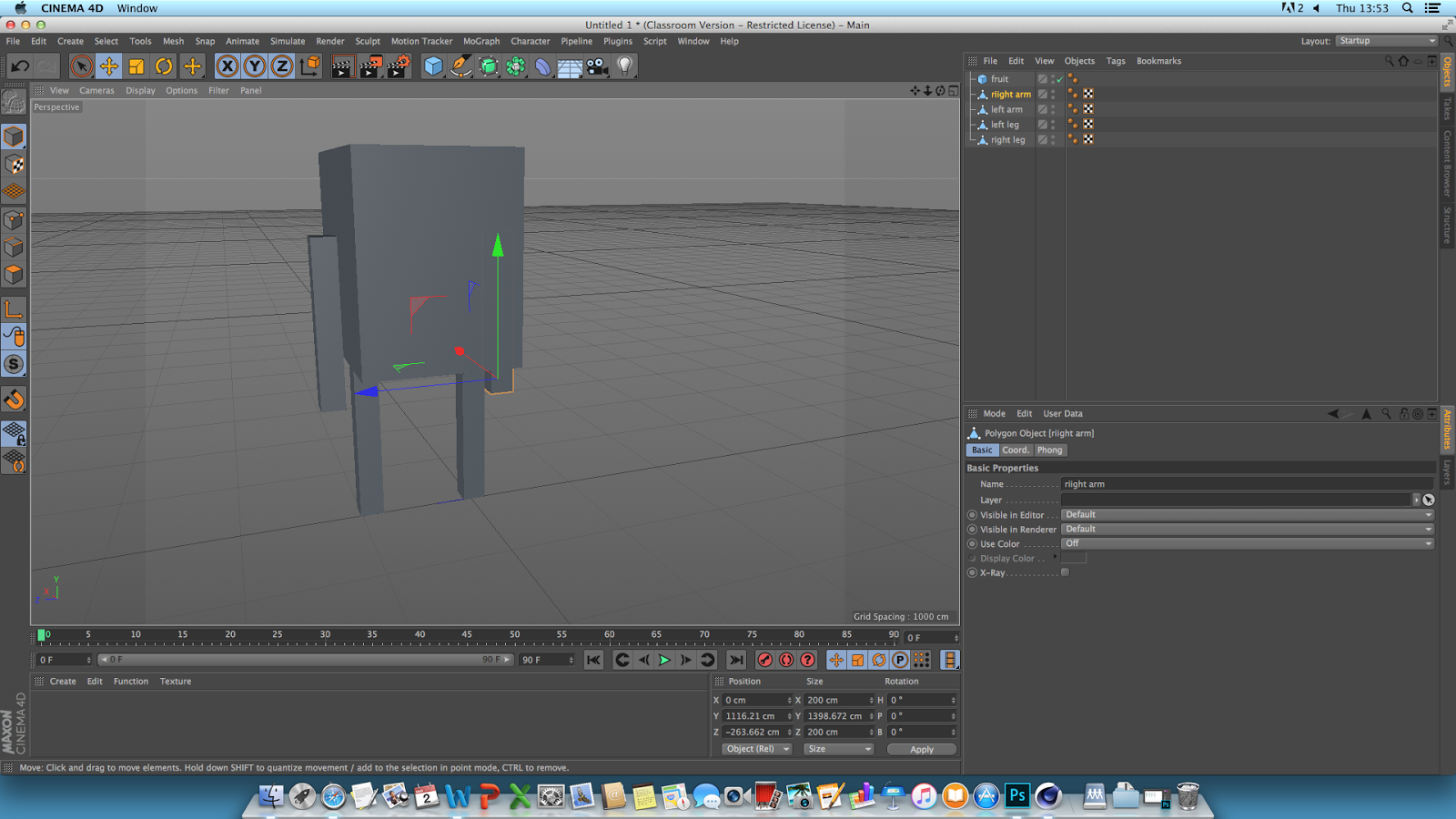
Development - CAAD SESSION 3 - CINEMA 4D

DIGITAL SKILLS - LEVEL 4 <--- catch up

Todays session is based on character rigging. It's the last CAAD session of this module and wraps up our 3D work. We will be making a segmented character where all the limbs are separate.

Start with a cube.


Make it editable by going in to the left hand side and clicking on the top button. It should appear in the layers as a triangle in front of the cube.


Select the Polygon Selection Tool.


Changed the view by going in to the third window. Panel > View 3


Insert segaments (cuts throughout the body so certain elements bend) by selecting the top of the cube and drag it in any direction so that its being pulled out. 


Go on to model mode.


Copy and Paste the second leg and arms where you want them.


Insert another cube.


Scale the cube to make it bigger.


Make editable.


Go back in to polygon selection mode and repeat the panel 3 - extrude. Shape it with the scale tool in to a lemon(?)


Drop lemon in to subdivision nirbs.


Make a subdivision for each of the limbs.


Go in to view 3, turn off the nirbs whilst rigging, click on a limb.


 Go in to he Character tab > Joint tool, hold down control, click down the leg and apply points where the segments are.


Shift the joint layer to the top whilst you delete the 'root', place it back and create an IK chain (inverted kinematics), click on the top joint, Character tags > IK tag.


Place end joint in to end the menu option that says 'end'.


Add goal leg control.


Add pole and move the pole to where the pole to where the knee should be (forward).


Select leg, hold control and select all the joints.


Go to character > command > bind


Repeat for the rest of the limbs.


Share: